DiamCalc download
GemAdviser download
Rapaport price list converter
 
Stereo movie viewer download
 
Oxygen Viewer download
Oxygen Microscope Server download
Oxygen Inclusion download
Oxygen XRay download
 
Helium Rough download
Helium Rough templates of reports
Helium Rough buttons
 
Helium Polish download
Helium Polish templates of reports
Helium Polish buttons
 
Pacor Client download
 
Set of Optimization Algorithms for Helium Rough & Pacor Client
 
External Cut modules download
 
Cut Quality Appraisers download
External Symmetry Appraiser download
 
DiamCalc Documentation
DiamCalc Howto..
Oxygen Inclusion documentation
Helium Polish Highlights
Helium Polish system manual
Helium reports documentation
 
The Gallery
DiamCalc scenarios
Rough and Polish diamond movies
Collection of different parametrical diamond models with IdealScope lighting
3DCalc demo .gem files
 
Download Stereo Movie Viewer

Stereo Movie Viewer 3.0 RC

March 28, 2012

The program Stereo Movie Viewer 3.0 RC is available for download. The new version allows to play movies in MOV and AVI formats.

What is new in Stereo Movie Viewer 3.0 RC (technical notes)?

News subscription

Email address


Stereo Movie Viewer 3.0.19 RC (12,5 Mb) is an installation program for Windows. It should be installed under administrative account.

Stereo Movie Viewer 2.17

June 7, 2011

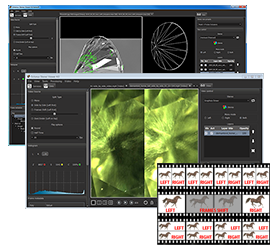
The program Stereo movie viewer allows to play movies and stereo movies in FLM format or series of photos in JPG or BMP formats.

The new versions supports playing DiamCalc stereo movies with realistic rendering of inclusions and depth-of-field effect, lens or human eye modelling. Download examples of movies on this page below.

What is new in Stereo movie viewer 2.17 minor update?

What is new in Stereo movie viewer 2.16?

News subscription

Email address


StereoMovieViewer.exe (2,7 Mb) - Stereo Movie Viewer 2.17.14.0 is a program for Windows. It should be installed under administrative account.

Quick Quide

  • Download and install StereoMovieViewer.exe
  • Start program

  • Press button Open to open FLM Movie or series of photos in BMP or JPG formats
  • Select a movie (FLM) or photo (JPG, BMP) in a series

  • Press button Open
  • Change Split type in the dialog and press OK


    Read description of split types below
  • Movie opens

  • Press button Play to start movie
  • To switch On / Off stereo mode press button
  • To enter Full screen mode press button
  • To exit Full screen mode press Esc
  • To adjust settings stop playing movie and press button
  • Settings dialog box will appear

  • Set Frames/sec
  • Check Round to loop movie
  • Select Stereo mode
    • Anaglyph (Red / Blue) for red-blue stereo glasses
    • Passive (Polarized) for interlaced polarized stereo glasses
    • Active (Shutter) for NVIDIA 3D Vision stereo glasses
  • Select Split type
    • Side by Side (Left first)

      In case of this split type the initial frame is divided in two images, for left and right eye, by vertical line.
      It is widespread content type.
    • Frame Shift (Left first)

      In case of this split type the images for left and right eye are presented from the stream of frames with some shift.
      For movies with rotating objects.
    • Over / Under (Left top)

      In case of this split type the initial frame is divided in two images, for left and right eye, by horizontal line.
      It is rare content type.
  • For comfort viewing stereo:

    In mode Side by Side adjust Frame Distance or use recommended value.


    In mode Frame Shift adjust Frame Distance and Frame Shift or use recommended values.


    Note. For changing parameters values use mouse or keyboard's left and right arrows
  • If you movie playing slowly select Style /File

Rough and Polish diamond movies section

Movies are available in FLM and Quick Time formats

System requirements

The program is designed to work under Windows XP/Vista/7 operating systems.

Stereo rendering requires OpenGL 1.4 and higher or DirectX 9.0c Redist (June 2010). We recommend using at least NVIDIA GeForce 6600 video card with latest drivers installed. For faster movie playing we recommend at least 1 Gb of Ram

Different stereo rendering modes requires additional hardware:

1) Red-Blue Stereo required red-blue glasses

2) Interlaced Stereo requires stereo monitor with interlaced stereo technology. We’ve tested the program with Zalman Trimon ZM-M220W Stereo Monitor.
3) Shutter glasses mode requires complete support of NVIDIA 3D Vision (Home or Pro) technology. Check hardware and software requirements here. Please note that for windowed stereo mode you’ll need an NVIDIA Quadro video card.


Examples of stereo movies

DiamCalc stereo movie with inclusions, light background

Movie in FLM format
(zip archive 17,5 Mb):


Frame Distance = -30

DiamCalc stereo movie with inclusions, black background

Movie in FLM format
(zip archive 18,7 Mb):


Frame Distance = -30