|
January 18, 2007 - Oxygen Inclusion 1.5.1 is released.
Fixed bug
On some stones Oxygen failed to create inclusion contour. In the
update 1.5.1 (build 282) this behavior is fixed.
What is new in the Oxygen Inclusion 1.5?
August 30, 2006 - Oxygen Inclusion 1.5 and Oxygen Taste are released.
The new features:
- Small spherical inclusions are available. These
inclusions can be adjusted manually with no contours.
- Improvements in the "move panel" including manual distance, angle and zoom steps.
- New tool allows to "draw" small contours in the
Inclusion selection plug-in.
1. Small spherical inclusions
Small spherical inclusions inclusions can be adjusted manually with no contours.
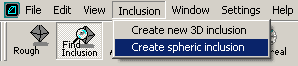
- Make a sphere inclusion with the menu command Inclusion / Create
spheric inclusion.
- Open several photos with inclusion seen from different directions
(in several scenes simultaneously) and check "inclusions" checkbox
on photo panel.
- Activate the scene without photo, select the inclusion in the
Inclusion locator panel, choose the object movement tool in toolbar
 ("hand" button).
- Move the inclusion so the virtual projections on photo will
coincide with the images:
- To resize the sphere press and hold the "Ctrl", then drag mouse left/right.
- The default movement mode is rotation. You may wish to switch to "shift" mode by appropriate button on the toolbar. You may shift even in the rotation mode - just hold the shift during mouse drag.
- It is also possible to adjust size and position of that inclusion with the Movement panel.
- Select the viewpoint rotation tool
 ("camera" button). ("camera" button).
- Call the "Clarity " button.
2. Improvements in the "move panel"
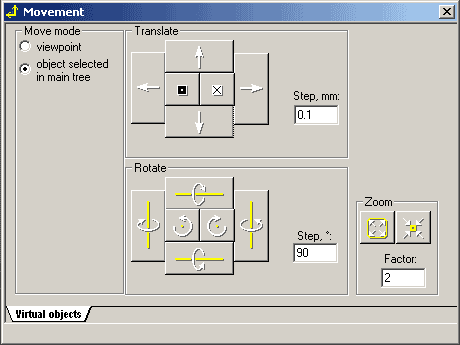
Manual distance, angle and zoom steps are included.
3. New tool allows to "draw"
small contours
in the Inclusion selection plug-in
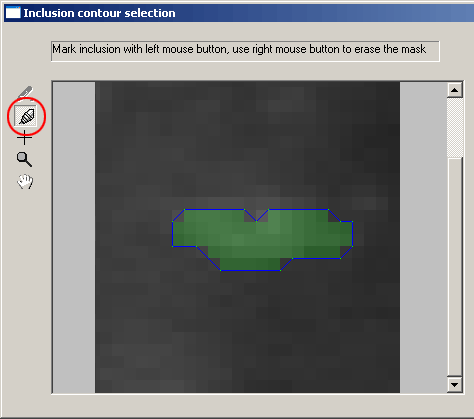
Select the new tool. "Draw" inclusion with left mouse button, erase
the selection with right mouse button.
Versions
history
Oxygen news
|
















