- New parameters Tilting data, Part weight, Distance
to Holder are included into rough reports
- Pictures with Crown (Table) facing up and Pavilion
bottom are available in the reports
- Working with Oxygen`s inclusions by Tool option
1. New parameters Tilting data, Part weight, Distance
to Holder are included into rough reports
New parameters are included into rough reports: Tilting data, Part weight, Distance
to Holder.
Please see example of new report:
The parameters output into reports with follow bookmarks names:
Tilting (DIAMOND_TABLE_TILT_x)
DIAMOND_TABLE_TILT_1
DIAMOND_TABLE_TILT_2
...
Part weight (DIAMOND_NEXT_PART_WEIGHT4_x)
DIAMOND_NEXT_PART_WEIGHT4_1
DIAMOND_NEXT_PART_WEIGHT4_2
...
Distance to Holder (DIAMOND_TABLE_DIST_TO_HOLDER_x)
DIAMOND_TABLE_DIST_TO_HOLDER_1
DIAMOND_TABLE_DIST_TO_HOLDER_2
...
2. Pictures with Crown (Table) facing up and Pavilion bottom are available in the reports
Crown (Table) facing up is set as default view for pictures with PictureID=DIAMOND_PIECE_REPORT_MODEL in .ini files.
All other views (crown, pavilion, etc.) can be received using standard rotation X,Y,Z=... as early.
To disable this behaviour should be included the command in a picture`s block with PictureID=DIAMOND_PIECE_REPORT_MODEL:
DiamondView=disable
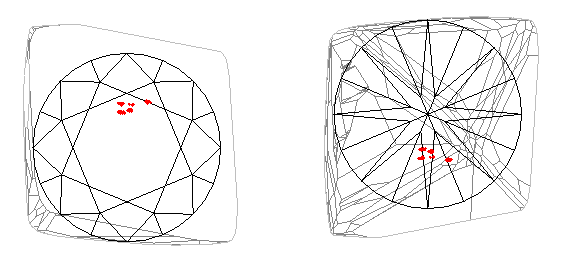
Please see examples of the report in the previous section 2, "New
parameters Tilting data, Part weight, Distance Holder are included
into rough reports".
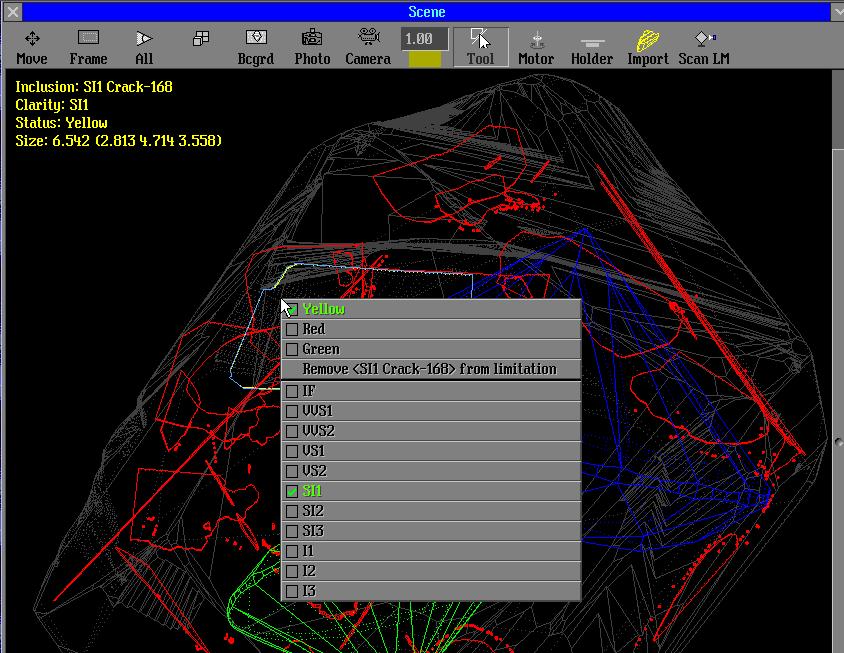
3. Working with Oxygen`s inclusions by Tool option
The information about inclusion is displayed in the Scene. Status
and clarity can be changed by Tools option. Inclusion can be removed from limitation list.
|
















