 |
- Open a project
- Different working
modes
- Tree panel is
the list with all solutions, rough diamond model, polished diamonds, inclusions
and etc
- Description
of scene
- Movement panel
- Working with
photo
- 3D inclusions
- Flat / 3D inclusions
- Small spherical inclusions
- Sandwich
- New algorithm
for fast automatic creation of inclusion contour
- Creating virtual
"windows" on the model
- Allocate diamonds
- Default diamond
color panel
- Appraiser and
pricelist in allocation
- Diamond parameter
panel
- Description
of stereo mode
FLAT / 3D inclusions
Oxygen Inclusion allows construct Flat types of inclusions. To create a flat
inclusion you need to build 3D inclusion with at least 3 contours, then click
"FLAT / 3D" button in the Inclusion locator
panel. With this button you can switch inclusion back into 3D-mode.
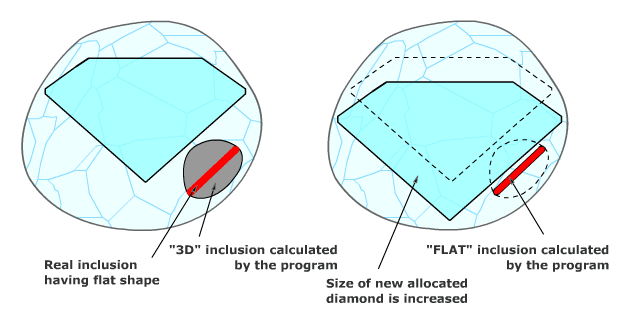
Please specify carefully type of inclusion with a flat shape. When you create
a crack as "3D" it might be constructed incorrectly because of absent photos
from thin side of crack. Select "FLAT" type for calculating proper shape. The
size of new allocated diamond could be increased.
|
|














