 |
|
|
|
 |
|
|
|
- Open a project
- Different working
modes
- Tree panel is
the list with all solutions, rough diamond model, polished diamonds, inclusions
and etc
- Description
of scene
- Movement panel
- Working with
photo
- 3D inclusions
- Flat / 3D inclusions
- Small spherical inclusions
- Sandwich
- New algorithm
for fast automatic creation of inclusion contour
- Creating virtual
"windows" on the model
- Allocate diamonds
- Default diamond
color panel
- Appraiser and
pricelist in allocation
- Diamond parameter
panel
- Description
of stereo mode
Allocate diamonds
- To allocate diamond switch to "Allocate" working mode.
- Call Process panel from menu "View/Show Process".
- On the "model" page select the desired allocation mode for inclusions:
- Green inclusion. Allocation will
allow this inclusion to be inside the allocated diamond, the only price
of affected diamond is considered.
- Yellow. "Smart" option. Allocation
algorithm considers both options (when inclusion is inside and outside
of allocated diamond).
- Red. Inclusion is not allowed to
be inside allocated diamonds.

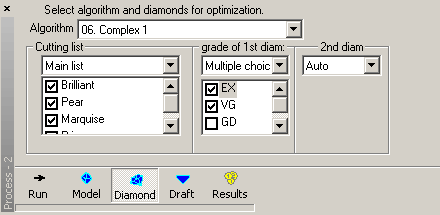
- Open the "diamond" page.

- Select the algorithm.
- Select the desired shape for each diamonds in allocation. There are
brilliant, marquise, oval, pear, princess, emerald, flanders, happy8,
baget and heart shapes of diamond.
- Set cut grade quality for diamond parameters: Auto, Excellent, Very
Good and etc. You can change the active appraiser
from menu "Settings/Select active appraiser".
- "06.Complex" and "06.Single" algorithms work especially
efficient with several inclusions in yellow smart mode. These algorithms
allow select different cuttings from lists and make multiple choice for
the 1st diamond quality.
- Open Default
diamond color panel from menu "Settings". Select the color that will be
assigned for allocated diamonds.
- Press «Run» button. The program will start allocating new solutions.

- After while you will find newly allocated diamonds in the Tree panel. A
new group of solutions is created every time you run allocations.

|
|
|
|
 |
|
 |

|














