What is DiamCalc and who benefits from it
Press Release. DiamCalc 3.0 and DiamCalc 3.0 Pro launched by OctoNus
What is new in the DiamCalc?
DiamCalc 3.0 Demo Movies
DiamCalc Internal Cuts
External cuts (DLL)
Versions history
System requirements
Online Store
 
Reports for polished brilliants
 
Download DiamCalc
DiamCalc Documentation (PDF)
 
License agreements
Online Store
 
Complete guide
Quick guide on Key operations (How to..)
OctoNus spread & AGS spread
FAQ's
Cut parameters
Cut Quality Estimation
How to Create High dynamic range (HDR) panorama
 
DiamCalc
DiamCalcSarin
3DCalc Pro
GemCalc
GemAdviser
3DBook

3DCalc family
 
DiamCalc : How to..
Quick guide on Key operations
   

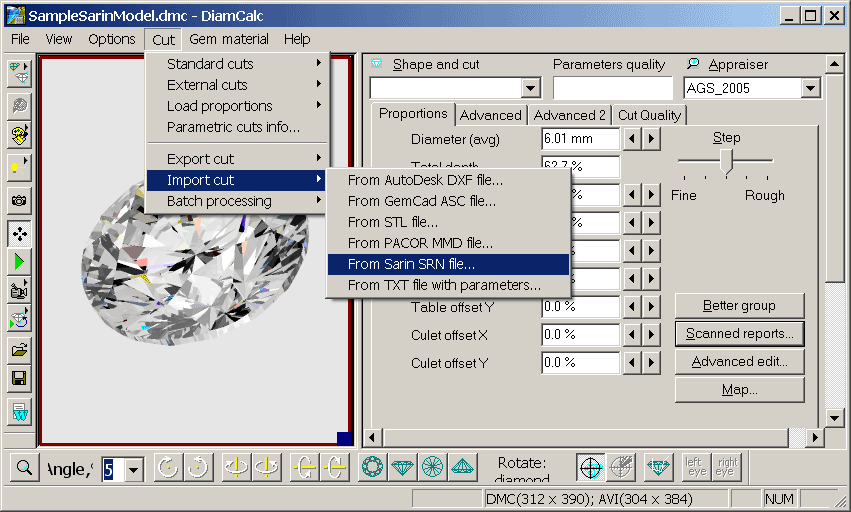
How to import 3D Sarin format (*.SRN)?

To import SRN file to DiamCalc, choose from menu "Cut / Import cut / From Sarin SRN file ..."

Note: DiamCalc works only with 3d-model of diamond from Sarin (*.SRN) and doesn't work with reports or rough diamonds models.