|
How to vary viewing parameters?
It is possible to use different presentations for some parameters. For instance,
a slightly oval shape of the girdle can be described by two diameters,
minimum and maximum. Alternatively, it can be specified by maximum
diameter and deviation (brilliant cut) or ratio of maximum and minimum
diameters (fancy cuts).
To choose a presentation option of such a parameter, point the
mouse cursor to the parameter's name and click right mouse button.
A menu appears, allowing to select a presentation option:
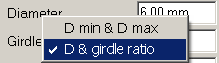
The picture above was taken when the mouse cursor was over "Girdle
ratio" field and the right mouse button was pressed. As you
see, a menu allows to select between showing maximum and minimum
diameters or just one diameter and ratio of diameters.
There are other dual parameters:
- Girdle square deviation <-> Alternative diameter (measured at direction 45°);
- Star facet length <-> Table picture square-likeness.
There is also a similar way to choose mass precision: 2 digits after decimal point <-> 4 digits.
|














